
At a Glance
WebMCP lets a website give AI agents tools to call instead of a page to read. I called the tools of every site in the webmcp.com directory to see which ones work. Most do. What goes wrong is mostly simple: tools Chrome can’t see, missing labels, and small details in the answers.
Below are the results, what I would get right first when building WebMCP tools, and how to use the data and the skill yourself.
In August I built six WebMCP tools for this site. Ask it where I was on a given day, and a tool answers directly. I tested them by hand in Chrome’s DevTools, one at a time. Nothing else ever called them.
That left me with questions I couldn’t answer. Do other sites’ tools work when an agent calls them? What do the good ones do differently? And what should I fix on my own site before WebMCP leaves Chrome’s origin trial? The existing checkers like Ora and Lighthouse grade whether a site is ready for agents, but none of them calls the tools. So I did, on all 2’964 sites in the webmcp.com directory, and put everything into a repository: the data, the code, and a skill for coding agents.
What I did
A script opened every site in Chrome with WebMCP switched on, the way an agent’s browser sees it. It listed the tools and called the ones labelled read-only, the ones that promise to only look something up. Tools that could change something, like sending an email or placing an order, were never called. The inputs come from Pascal Birchler’s webmcp-audit: the required inputs, all inputs, one edge value per call such as an empty string, and a few deliberately wrong ones. No answer was stored.
What came out of it
A third of the sites show Chrome no tools
The directory lists 2’964 sites with tools. Chrome saw tools on 1’748 of them. 933 showed nothing at all, and the rest blocked the script, failed to load or asked not to be visited.
About half of the empty sites use a polyfill, a script that adds WebMCP to browsers without it. Many of those never hand over to Chrome’s own WebMCP, so Chrome never sees the tools. Of the 537 sites using one, 459 showed Chrome nothing. Another 28 register their tools under an old name, navigator.modelContext, that Chrome no longer reads.
Still, 59% of the listed sites already show tools, while no stable browser ships WebMCP yet. Some support is better than none.
If your tools are not listed in DevTools, no agent will find them.
Most tools work, depending on how you count
The script called 3’842 tools on 931 sites. 87% of the calls with sensible input came back without an error. Per tool, it is stricter, because one bad call fails the tool. By that measure, 69% worked on every call.
That number depends on the rules, so I looked at the 1’203 tools that failed. 337 work, but have a null somewhere in the answer. The audit says Chrome’s built-in AI rejects that, so it counts. 127 answered “not found” to an id the script made up, which is the right answer. 91 only stumbled over an edge value like an empty string, and 56 need a login. Count those as working, and it is about 85%. The rest, about one tool in seven, really failed: an error on a plain input, or an error message passed off as a normal answer.
Agents are rarely told what is safe
A tool can carry labels for the agent. readOnlyHint says “I only read, call me freely”. untrustedContentHint says “my answer contains text someone else wrote”. 39% of all tools carry no label at all. And only 49 sites mark any tool as one that changes something. The directory counts tools that take action, like booking or adding to a cart, on 919 sites. So an agent mostly has to guess when to ask.
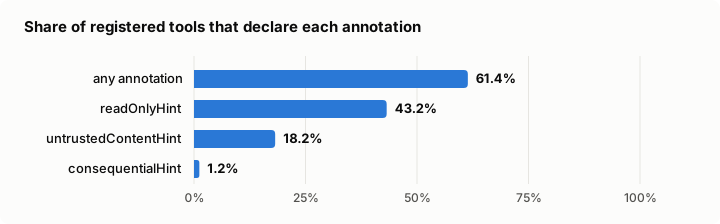
There is a second catch. The read-only label can’t be checked from the outside. 195 sites have read-only tools that sent data to their own server during a call. Mostly harmless: analytics, or a tool that sends its question that way. But from the outside, a lookup and a change look the same.
The agent has to trust the label, so the label has to be honest.
Where it works best
Websites within categories like productivity and business, tools work most often: 79% of the called tools, and on 60% of those sites every tool worked. Travel and events is the odd one. More of its listed sites show tools than in any other category, 73%. But its tools work least often, 59%. They depend on live prices and availability, which is my best guess for why. Commerce has the fewest sites where every tool worked, 38%.
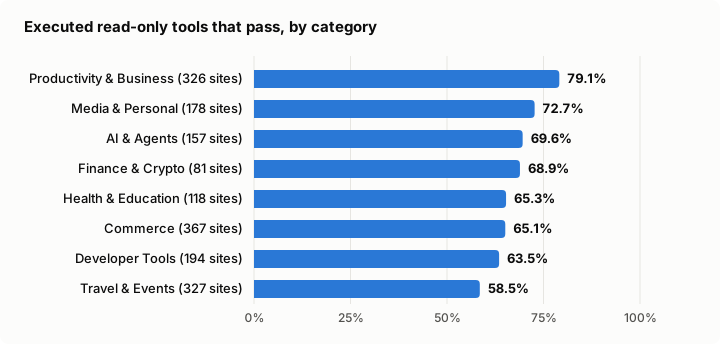
A travel site whose tools fail now and then is still further along than a shop that shows Chrome nothing.
Good sites keep it small and clear
455 sites passed every call. Compared with the sites where something failed, they register fewer tools, about five instead of eight. Their descriptions are shorter, and more of their inputs are described.
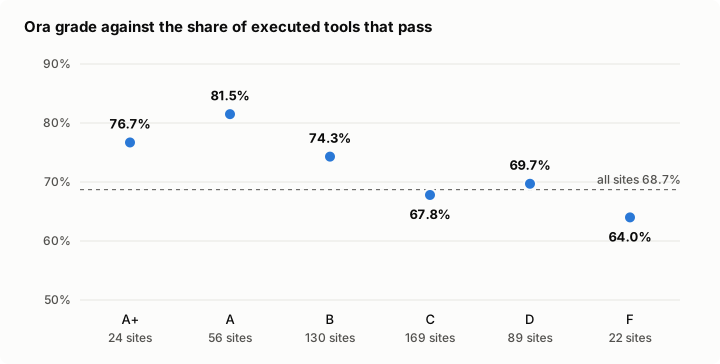
A good score from a readiness checker says little here. Ora graded 766 of these sites. Sites with an A show tools to Chrome more often. But across all graded sites, the score and the share of working tools barely move together.
A good score doesn’t mean the tools work.
Findings are not rules
The audit flags more than it fails. 673 sites accept input their own schema calls wrong, and 569 return answers longer than 1’500 characters. Neither fails a tool. The 1’500 comes from Chrome’s own guidance, which calls it a recommendation that may change. For the cloud agents most likely to call a tool, 3’000 characters is roughly 750 tokens.
I found that out on my own site. I ran the skill from this census against my tools, and some of what it made me change was wrong. Stricter input checks rejected a limit of “10” that used to work, and a null that some clients send to mean “leave this out”. The character budget did more damage. Listing all 134 trips suddenly took about 17 calls instead of one.
A clean audit report is not the goal. A useful answer is.
How to build WebMCP tools that work
The API
The API itself is small. A tool is a name, a description written for a model, a schema for the input, a function, and a few labels. Aborting the signal removes the tool again.
const controller = new AbortController();

await document.modelContext.registerTool({
  name: "search_trips",
  title: "Search trips",
  description: "Find trips by country or city. Use it when someone asks where or when I travelled.",
  inputSchema: {
    type: "object",
    properties: { place: { type: "string", description: "Country or city, for example Peru or Lima." } },
    required: ["place"],
  },
  annotations: { readOnlyHint: true },
  async execute({ place }) {
    return { trips: await findTrips(place) };
  },
}, { signal: controller.signal });
The takeaways
From the spec and from 2’964 sites, these are the things I would get right first:
1. Make sure Chrome sees it
Register on document.modelContext, early, without a click or a login. If you use a polyfill, check that it steps aside when Chrome has the real thing. Then look in DevTools under Application, WebMCP, with chrome://flags/#enable-webmcp-testing switched on.
2. Write for a model
The description says what the tool does and when to call it. Every parameter gets a description with its format, like “Arrival date as YYYY-MM-DD”. Chrome recommends up to 500 characters per description and 150 per parameter.
3. Label every tool
readOnlyHint for lookups, consequentialHint for anything that books, buys or sends, and untrustedContentHint when the answer carries reviews or comments written by others.
4. Fail loudly, answer completely
Throw an error when a call fails, so the agent knows. Return an object without null. Put the important data first, and page long lists instead of cutting them.
5. Keep the set small
Five good tools beat fifteen half-described ones.
Most of the mistakes in the census come down to the same few things: tools Chrome can’t see on 933 sites, no labels on 39% of the tools, no description on 41% of all parameters, error messages passed off as answers on 332 tools, and a null in the answer on 211 sites.
The low-hanging fruits, then. Check DevTools once. Add the labels. Describe the parameters. Throw instead of returning an error message. Leave out fields that would be null. And if you have a simple search or contact form, two attributes turn it into a tool: toolname and tooldescription. Chrome supports that declarative form, but the spec draft dropped it in October, so treat it as Chrome’s for now.
Pascal’s ESLint plugin catches most of this in the editor, before anything reaches a browser.
Use the data and the skill
Everything is on GitHub. A skill for you to integrate, or review your WebMCP into the codebase, is included. The skill carries the spec, the census findings and Pascal’s checks into your coding agent. In Claude Code:
/plugin marketplace add mawiswiss/webmcp-census
/plugin install webmcp-readiness@webmcp-census
For Cursor, Codex, GitHub Copilot and other agents, npx skills add mawiswiss/webmcp-census does the same. Or copy the one file into your project.
Then ask your agent to review your WebMCP tools with the skill, and check the result against a running site with npx @swissspidy/webmcp-audit https://your-site.example --smoke. Read its warnings as questions, not orders.
For research, census.csv has one row per site and 74 columns, explained in COLUMNS.md. summary.json and learnings.json hold the totals and the comparisons. The raw records come with the release. That is enough for questions nobody had data for so far. How do 1’748 sites name and describe 9’149 tools? Which parts of the spec does anyone use? Declarative forms are on 265 sites, for example, and tools shared with other websites on none. The data is CC BY 4.0. If you use it, credit and link this post or the GitHub for reference. I plan to crawl this dataset quarterly and release a new version of the raw dataset.
Limits
The script sees what a fresh browser sees in its first seconds on a page. It misses tools that appear only after a click or login. Sites behind bot protection show up as blocked, not as broken. A second run on 30 random sites matched the first on 28. The full method is in METHOD.md.
Conclusion
Most WebMCP tools work when an agent calls them. What fails is earlier and simpler: tools Chrome cannot see, and labels that don’t tell an agent what is safe. Both are quick to fix, and DevTools shows you the first one in a minute.
Use the skill added in the repo. It helps you implement WebMCP using the specs and findings from this dataset.
The next census is planned for 22nd December 2026.