
At a Glance
Chrome is quietly shipping a way for websites to hand AI agents a set of tools instead of making them read the page. I built six of them for this site. Ask where I was on a given day. Ask what I know about a city. The page answers directly.
A tool either answers a question or does something to the page. That split is the interesting part of the standard. Nothing calls these tools yet. Gemini in Chrome is expected to be first.
Ask my site where I was on 1 April 2022, and it answers: Bogota, Colombia. Seven days there, then Lima for thirteen.
No search results page. No crawler guessing from prose. The page hands the answer over, because it now carries tools an AI agent can call directly.
That is WebMCP, and it landed in Chrome as an origin trial this year.
What it actually is
A page registers tools on document.modelContext. Each tool gets four things. A name. A description written for a language model rather than a developer. A JSON Schema for its inputs, and a function that runs.
An agent in the browser reads that list. Then it calls what it needs.
That is the whole idea. No scraping. No screenshots. No guessing which div holds the price.
Chrome runs it as a public origin trial from version 149 to 156. Edge has it behind a flag. Firefox and Safari are watching from a distance.
The six tools on this site
My site is a travel journal. So the tools are about places, dates and trips. Nothing else.
get-place takes a country or a city and returns everything I have recorded about it. Days spent, the trips that went there, any guide I wrote.
Madrid, Spain
https://marcwieland.name/country/spain/madrid/

Madrid is a place in Spain. Marc has spent 42 days there in total.

Trips:
- Based in Madrid for a month (2025)
- Working and exploring in and around Madrid (2022)
- Andorra Roadtrip for vacation (2021)
- Exploring the Canary Island (2021)
It resolves partial and accent-free names. So “chiang mai” and “san sebastian” both land where you expect. The trip links carry the anchor for the stop itself. An agent lands on the Madrid section, not the top of a long post.
get-travel-stats answers at whatever precision you ask for. A year. A season. A month. A single day.
In April 2022, Marc was in Bogota, Colombia (7 days), then Lima, Peru (13 days), then Huacachina, Peru (2 days), then Pallasca, Peru (5 days).get-current-location gives you where I am right now, as fields rather than a sentence.
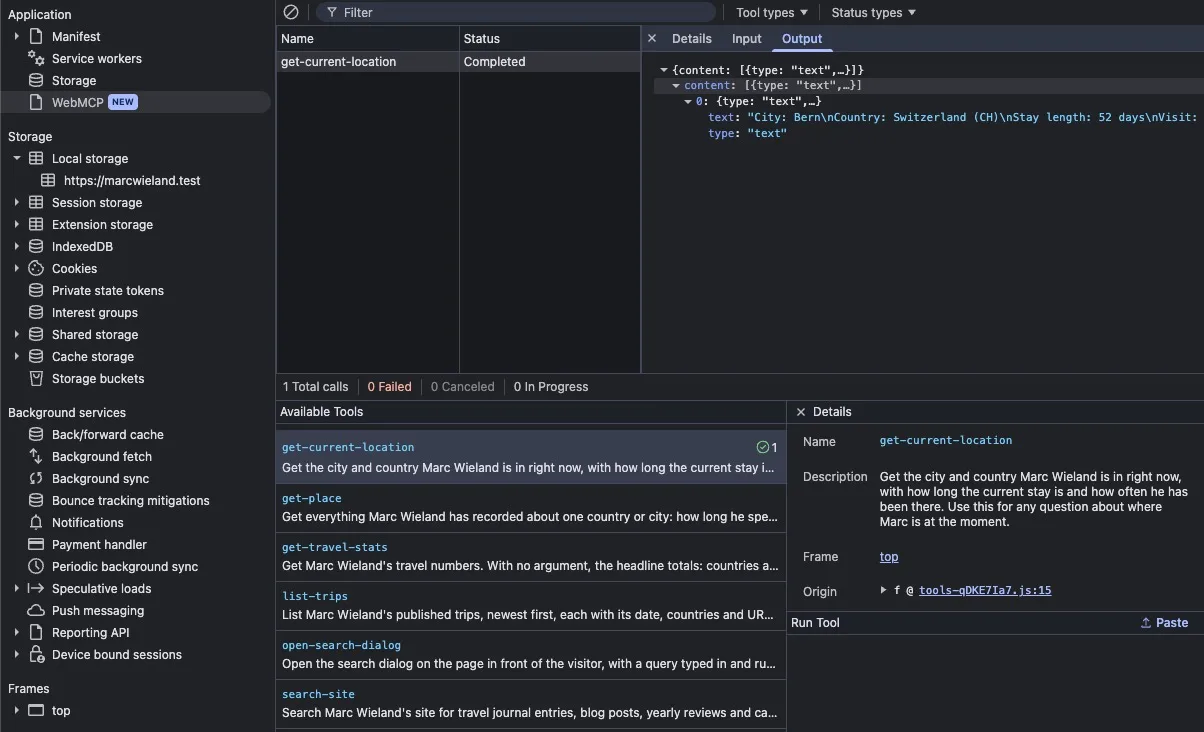
City: Bern
Country: Switzerland (CH)
Stay length: 52 days
Visit: 22nd time there
Then search-site for full-text search across posts and trips, list-trips for the trips themselves, and open-search-dialog, which behaves unlike all the others. More about that later.
Tools that read, tools that act
A WebMCP tool does one of two things. It answers a question, or it does something. That split matters more than it sounds, and it is the part most write-ups skip.
Five of mine answer. get-place, get-travel-stats, get-current-location, search-site and list-trips all take a question and hand back text. Nothing changes on the page. An agent can call them in any order, twice over, in parallel, and the site is exactly as it was.
That makes them safe to guess at. If a model is unsure which one fits, trying the wrong one costs nothing but a moment.
A read tool can be guessed at. An act tool cannot.
The sixth is different. open-search-dialog opens the search palette in front of the person, with their query already running. Call it twice and you have opened a dialog twice. It returns no data at all.
That is the mildest possible action. It changes what somebody is looking at and nothing else. It is still a different contract, and the description has to say so. The only thing a model has to go on is the words you wrote.
Read tools are where the accuracy comes from. My day counts are exact because they are computed rather than parsed. A number arrives as a number. A date arrives as a date.
Act tools are where this gets genuinely interesting, and where it needs care. A booking site can expose availability for a date range instead of making an agent drive a date picker. A shop can expose stock, and a cart. A support page can expose “check the status of order 4021”. Every one of those is currently done by a model looking at pixels and clicking hopefully.
This means WebMCP is way faster and more accurate, but it’s something the website has to provide. So the AI providers can do nothing but push adoption of the WebMCP standard or improve how they read sites better and faster. But nobody knows better how the website works than the one running it.
An agent driving a date picker through screenshots is a workaround, not a feature.
The moment a tool has consequences, though, somebody has to confirm it. An agent that can add to a cart is useful. An agent that can complete a purchase without being asked is a liability, and the standard’s own guidance says as much. On a personal blog, there is almost nothing an agent should be allowed to do. No cart. No booking. No contact form.
Which agents actually call this
Now, the part that surprises people, including me at first.
Two very different kinds of AI agents visit a website, and they behave nothing alike.
One reads. It crawls the page, summarises it, and decides whether to cite you in an answer. That is ChatGPT, Perplexity, Claude, Google’s AI answers. It also decides whether you appear at all. And it never executes a tool.
The other acts. It drives a live page on behalf of a person who is sitting right there. That is what WebMCP serves.
WebMCP will not get you cited. It gets you used.
So if the goal is showing up in AI answers, WebMCP is the wrong lever entirely. That job belongs to real structured data on the pages where the meaning lives. WebMCP is for the other half. The half that has barely arrived.
Where this goes
Nothing calls these tools yet. Worth saying plainly.
Chrome’s own DevTools has a WebMCP panel now, under Application. It lists what a page registered, lets you fill in parameters and run a tool, and shows you what came back.
That panel is how I tested mine. For the moment, it is the main way anyone will see this working at all.
Gemini in Chrome is announced as the first real consumer. When that ships, every page with a tool surface will be used by an agent that didn’t have to learn the page first. Lighthouse has already added agentic browsing audits, which is usually the signal that something is about to stop being optional.
My guess is that the pressure will not come from SEO advice. It will come from a support team noticing that agent traffic finishes a task on a competitor’s site and gives up on theirs.
Trying it yourself
No token needed locally. Enable chrome://flags/#enable-webmcp-testing, restart Chrome, and load a site over HTTPS. The API is gated on a secure context, so plain HTTP silently has nothing at all.
Then open DevTools, go to Application, and look for WebMCP. If a page registered tools, they are listed there with a Run button.
Most pages will be empty for a while. Mine is not.
Conclusion
WebMCP turns a page from something an agent has to interpret into something it can call. Every tool either answers a question or does something, and knowing which one you are writing decides how much care it needs. Read tools want accuracy. Act tools want a human in the loop.
None of this is an SEO move. Citations still come from crawlers reading your markup. The tools are the bet on next year when WebMCP gets called by AI providers. It’s there to get things done. Goods ordered, data inserted. Full workflows AI does on behalf of a human.