

At a Glance
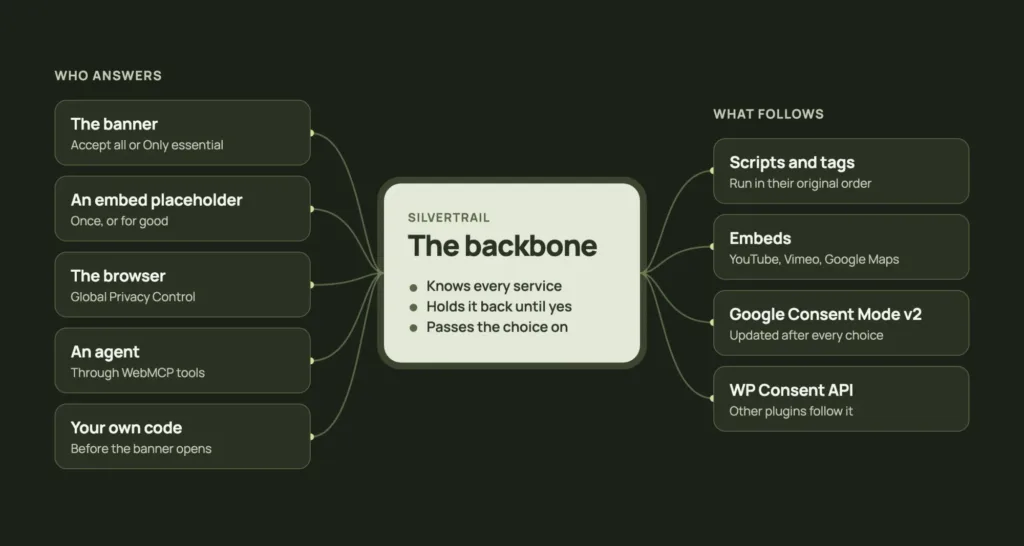
Silvertrail is a free consent and cookie banner for WordPress, built for developers and AI agents. Behind the banner, it holds back each tracker, script and embed it knows until the visitor agrees, and passes the choice on to Google, to other plugins and to the site’s own code.
I built it around four goals: developers and AI first, a lightweight plugin without external dependencies, fewer cookie banners on the web, and a solid base in WordPress for everything that needs consent.
The setup lives in code. An agent writes it, checks it on the shell and tests the site in the browser through WebMCP tools.
A year ago I wrote that the web is unusable by now. Most sites greet you with a pop-up before you have read a single line, and often that pop-up is the cookie banner.
So why did I build one? Silvertrail is a cookie banner too, and on a site with a tracker, a first-time visitor gets a dialog and has to answer it. But the banner is not the part I care about most.
What I care about sits behind the dialog. A WordPress site loads things from other servers all the time: Google Tag Manager, a HubSpot form, a YouTube video, a map on the contact page. Each of them needs consent, and each of them gets onto the page in its own way. Silvertrail is the one place in WordPress that knows these services, holds each one back until the visitor agrees and passes the choice on to everything else that needs it.
The banner is only the part that asks. I built the base behind it.
Four goals
Four goals decide what goes into Silvertrail and what stays out.
Developers and AI first
I expect agents to set up Silvertrail as often as people do. So the setup lives in code, where an agent can write it and a developer reviews it in version control. The admin keeps only the decisions a site owner makes, and when code sets a value, the admin marks the field, so nobody wonders why a change there doesn’t stick.
The shell and MCP read the setup and check it, and over MCP an agent turns presets on as well. The complete documentation ships in the plugin folder, so an agent reads the version the site runs. The same pages are online, with an llms.txt for agents.
I expect agents to set up Silvertrail as often as people do, so I wrote the shell and the docs for them.
Lightweight
Every feature is also something I maintain on a side project, so Silvertrail stays small on purpose. It adds one small script and one stylesheet to a page and has no external dependencies. The plugin contacts no outside service on its own, and uninstalling it removes its options, its table and its scheduled job.
Every feature is a maintenance duty on a side project, so Silvertrail stays small on purpose.
Fewer cookie banners
I want fewer cookie banners on the web, and that includes my own. Silvertrail shows a banner only when the site uses something that needs consent. A site that only embeds videos and maps shows none at all, because each embed asks on its own placeholder. A browser that sends Global Privacy Control gets only the essentials without ever seeing a banner, and an agent answers through tools instead of clicking.
As browsers take over more of the asking, the banner can go. Everything behind it keeps working, because a site still has to know what it loads from other servers.
I want fewer cookie banners on the web, and that includes my own.
A solid base for consent
I wanted one place in WordPress that knows each service, holds it back and hands the visitor’s choice to the rest of the site. Google Consent Mode gets it, plugins that read the WP Consent API get it, and your own code asks the same place instead of keeping its own answer.
I wanted one place in WordPress that holds the choice, so the rest of the site doesn’t have to guess.
What it solves in a project
The goals are easiest to see on a real setup. Take a typical client site with Google Tag Manager, a HubSpot form, a chat widget and a few YouTube videos in the blog posts.
The setup is one file
We start with a must-use plugin, so the whole setup sits in version control instead of the database:
add_action( 'silvertrail_register', function () {
	silvertrail_register_service( 'google-tag-manager', [ 'tag_id' => 'GTM-XXXXXXX' ] );

	silvertrail_register_service( 'hubspot', [
		'group'       => 'marketing',
		'name'        => 'HubSpot',
		'provider'    => 'HubSpot, Inc.',
		'purpose'     => 'Tracks form conversions.',
		'privacy_url' => 'https://legal.hubspot.com/privacy-policy',
		'hosts'       => [ 'js.hs-scripts.com', 'hubspot.com' ],
		'handles'     => [ 'hubspot-tracking' ],
	] );
} );
The preset prints Google’s official tag and holds it back. HubSpot gets its hosts, so the banner lists it and the Leak check recognises its requests. Its handle holds back the script a plugin enqueues, together with the code WordPress adds before and after it, and gated scripts run in their original order once the visitor agrees.
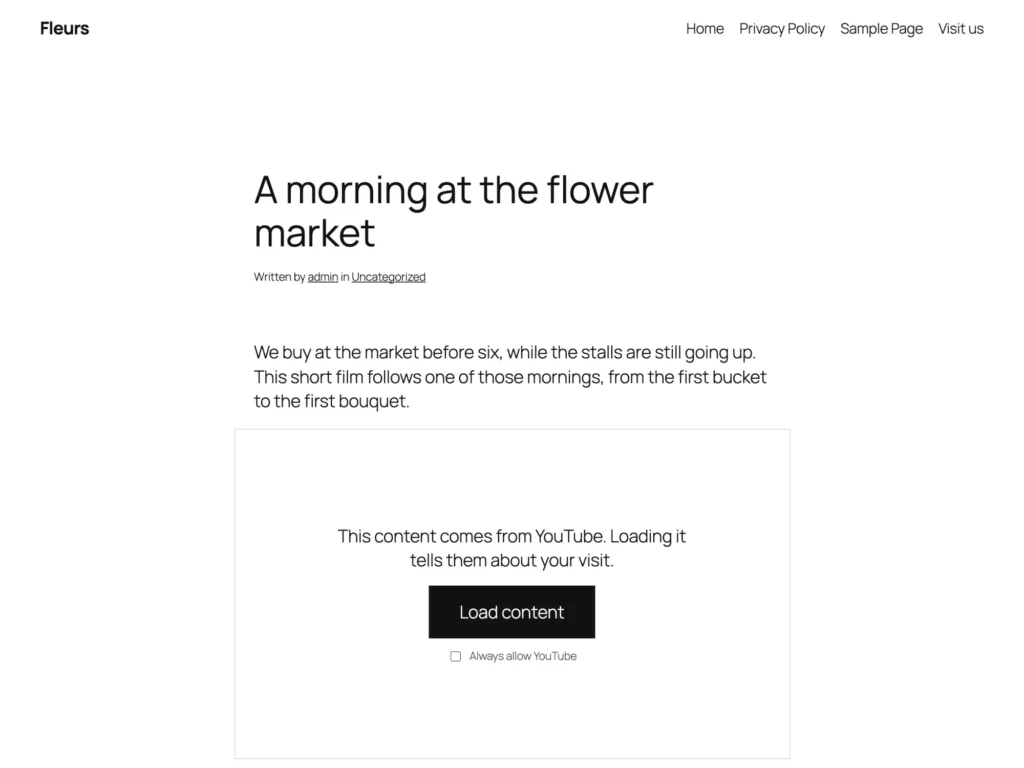
The YouTube videos need nothing. YouTube, Vimeo and Google Maps are blocked from the moment the plugin is active, in post content, oEmbeds and Custom HTML blocks, and each video asks on its placeholder, once or for good.
Then you run wp silvertrail validate, or an agent does. It lists every unknown key, every tag ID that doesn’t fit and every invalid setting, and the setup is done when it reports that the config is valid.
Behind the page cache
The page cache decides how all this has to work. A cache stores a page once and hands the same copy to every visitor. If the server printed HubSpot’s script for someone who had agreed, the next visitor would get it too, without ever being asked.
So I let the server decide nothing. It renders every page with every gated script and embed blocked, and Silvertrail’s script checks the choice in the browser on each page view. That’s why it works behind any page cache without a single exclusion, and why a stale cached copy neither asks again nor overwrites a newer choice.
I let the server decide nothing. The browser decides on each page view.
Your code reads the same choice
The chat widget doesn’t fit into a script tag, because it is configured before it loads. Register it as a service too, with its hosts, so the banner lists it. Then the widget’s script asks Silvertrail and listens for the change:
let started = false;

function startChat() {
	if (started || !window.silvertrail.has('chat')) {
		return;
	}
	started = true;
	const script = document.createElement('script');
	script.src = 'https://widget.example-chat.com/loader.js';
	document.head.append(script);
}

document.addEventListener('DOMContentLoaded', startChat);
window.addEventListener('silvertrail:change', startChat);
The change event covers a visitor who agrees later on the same page, so the chat starts without a reload.
PHP reads the choice as well, but only on requests a cache never serves, such as a form post. A newsletter form passes the address on to HubSpot only with consent:
if ( silvertrail_has( 'hubspot' ) ) {
	wp_remote_post( 'https://api.example.com/subscribe', [ 'body' => [ 'email' => $email ] ] );
}
That function never decides what a page prints, because a cached page would hand one visitor’s choice to the next. On a page, the browser decides.
Other plugins get the choice without any code. Google Consent Mode v2 gets its default before any Google tag, and every choice updates it. The WP Consent API gets every choice as well, so plugins that read the API follow the visitor. When the records belong in a CRM, the silvertrail_recorded action hands over every decision with its choices, source and time.
A leak doesn’t show on screen
A banner that lets a tracker through looks exactly like one that blocks it, because the request runs in the background. So the Leak check opens your pages as a first-time visitor, declines, agrees and tries each service on its own. Then it lists what ran without consent, with a fix for each finding.
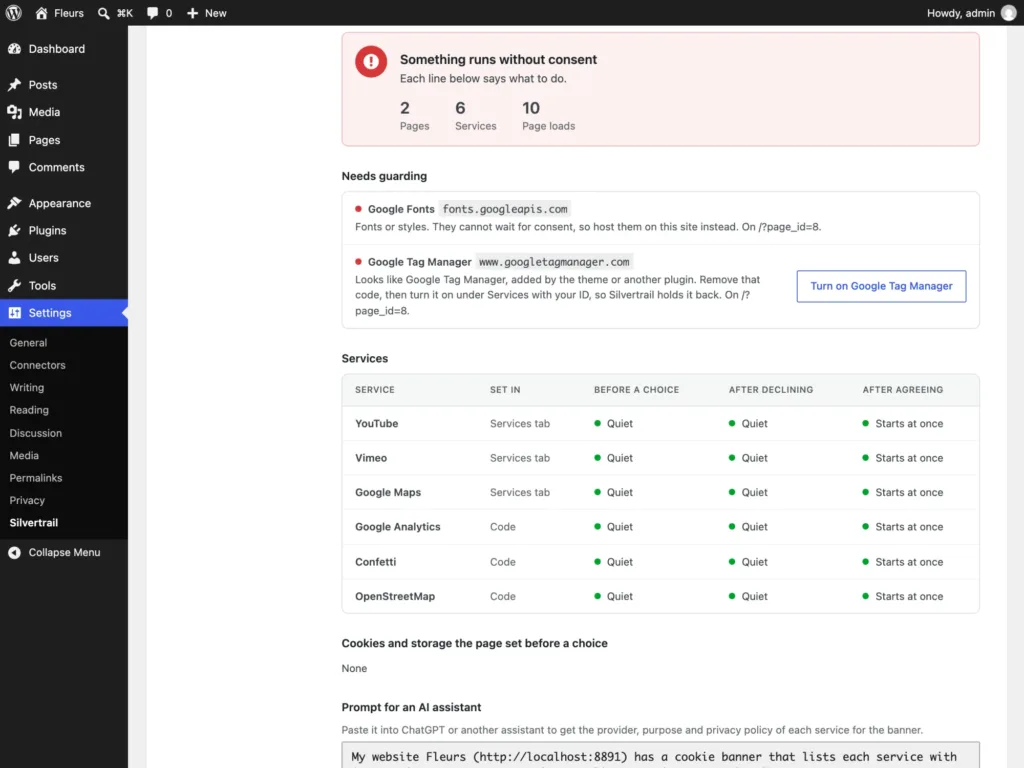
The same check runs in CI with the Playwright helper from the plugin’s testing folder, so a tracker that loads before consent fails the build:
import { expectConsentWorks } from '../wp-content/plugins/silvertrail/testing/expect-no-leaks.mjs';

test('consent works on the pages that matter', async ({ page }) => {
	await expectConsentWorks(page, ['/', '/contact/'], { allow: ['cdn.example.com'] });
});
I wanted to see what a page really loads, so the Leak check is part of the plugin.
Agents set it up, check it and answer it
Code comes first because agents work there, and an agent meets Silvertrail in three roles.
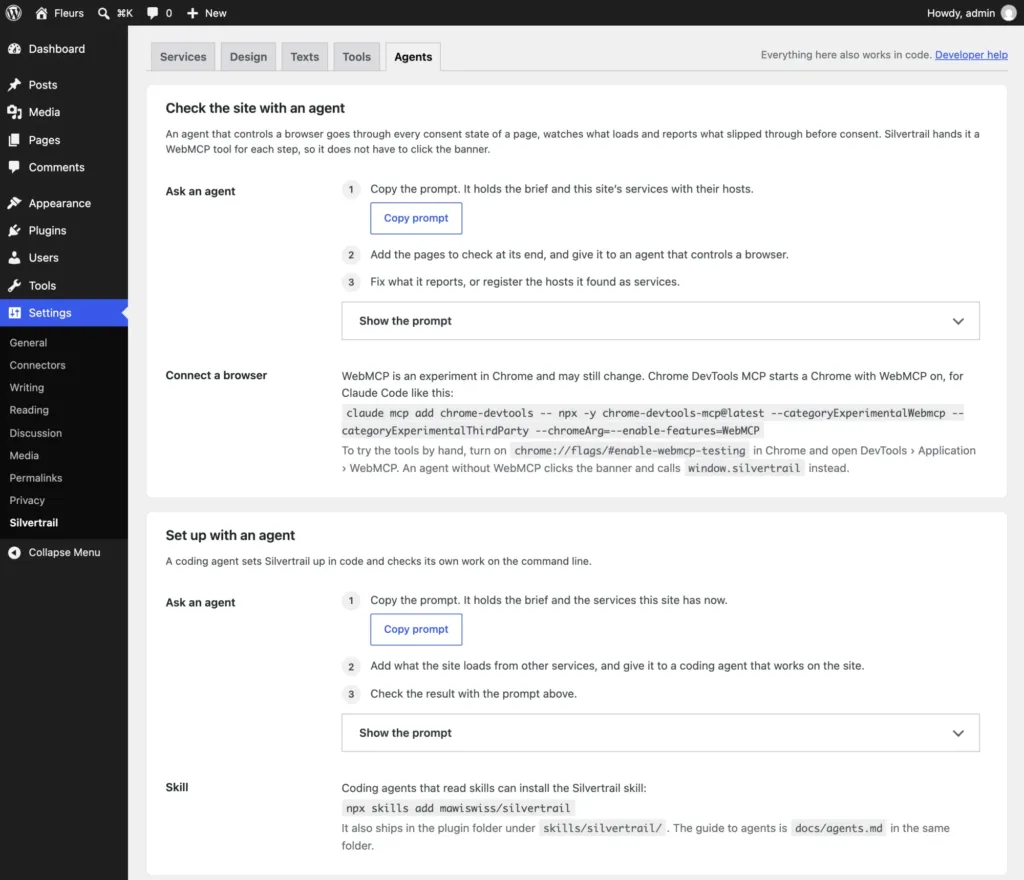
A coding agent with a shell writes the setup and checks it with wp silvertrail settings and wp silvertrail validate. Agents that read skills install the Silvertrail skill with npx skills add mawiswiss/silvertrail. An agent without access to the code works through WordPress abilities instead. From WordPress 6.9, the MCP Adapter hands them to any MCP client, and the agent reads the services, turns presets on and validates the result. Each ability needs manage_options, so an agent can do no more than the administrator it signs in as.
The admin’s agent checks the site from a browser it controls. The Agents tab copies a prompt with the site’s services, and the agent goes through every consent state of a page and reports each host that loaded before a yes. With WebMCP, Silvertrail offers it a tool for each step, so it doesn’t have to click the banner.
The same tools serve the visitor’s agent. It reads the services and answers through a tool instead of the dialog. It may allow only essential on its own, because nothing extra loads, and it asks its person before it allows more. WebMCP is still an experiment in Chrome, and visitors’ browsers offer it only on a site with a trial token. Without it, the banner works as before.
I let an agent decline on its own. Agreeing needs its person’s answer.
It looks like the site
I didn’t want a settings page full of colour pickers. The theme already knows its colours, corners and buttons, so the banner reads them from theme.json and fits the site from the start.
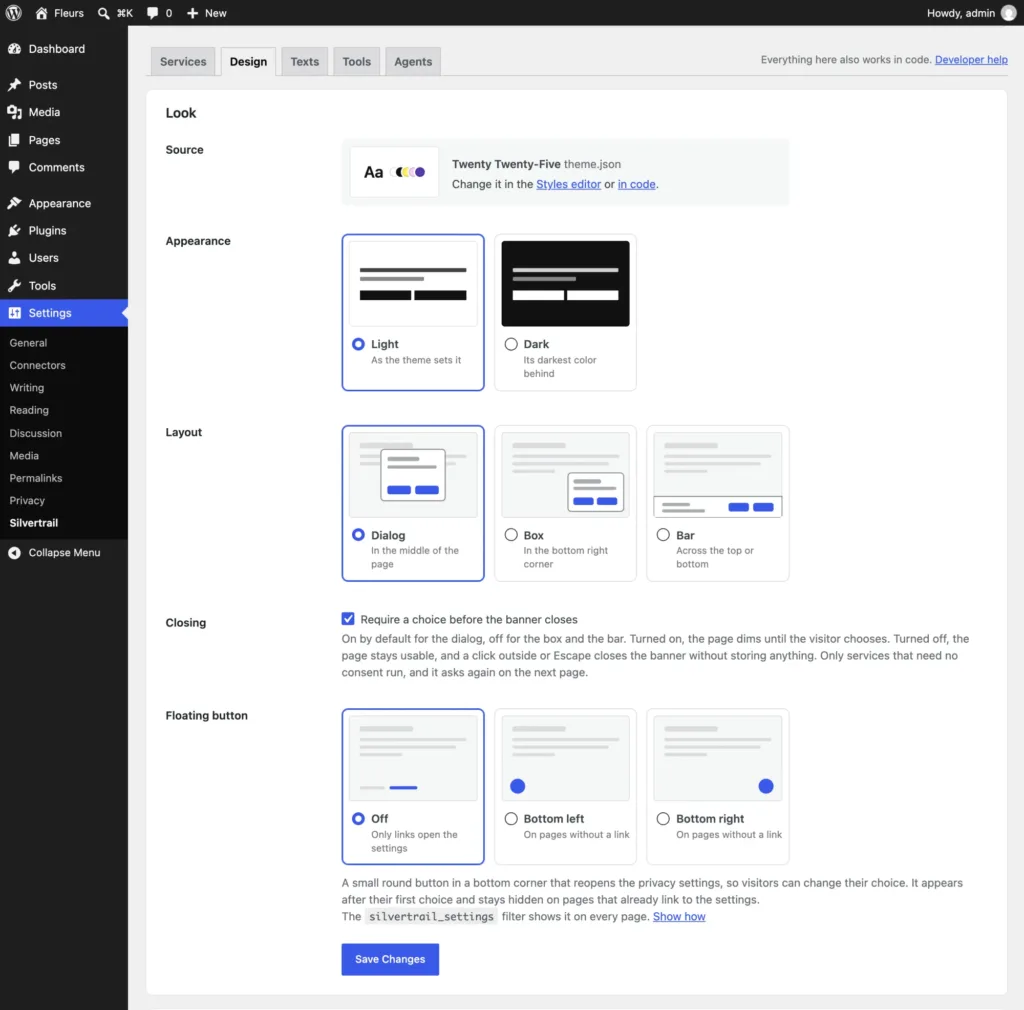
When a project needs more, the silvertrail_design filter changes single values, and a silvertrail.css in the theme replaces the design completely. That stylesheet is a job for an AI, so the admin copies a prompt with the theme’s colours, fonts and current stylesheet. From WordPress 7.0, Write with AI sends it to the site’s own AI provider and shows the stylesheet for you to check and save in the theme.
Try it
- silvertrail.marcwieland.name, the landing page with the four goals and how the choice is passed on
- The documentation, with every hook, setting and command, and an llms.txt for agents
- Silvertrail on WordPress.org, or
wp plugin install silvertrail --activate - The code on GitHub, with the same documentation in its
docsfolder
Silvertrail is free, with every feature included for good. When someone pays you to put it on their site, consider a site licence. It costs 29 US dollars or euros a year, and an agency licence covers any number of sites for 199 a year. It works on your honour: there is no pro version and no key, and nothing in the plugin checks whether you bought one.
Conclusion
A cookie banner promises that nothing loads before the visitor agrees. Whether that holds is decided behind the dialog: in the page cache, in the embeds and in the requests that run in the background.
That’s why I built Silvertrail as a solid base first and a banner second. If browsers answer the question one day, the banner goes and the base stays.