
At a Glance
wavetyper is a free desktop app for Mac, Windows and Linux. It turns a recording into text on your own computer, and nothing gets uploaded.
It plays the recording along with the text, knows who said what on a call with two tracks, and brings dedicated models for Thai and Swiss German.
To try it without installing, there’s wavetyper Lite in the browser.
A friend came over and asked me how to transcribe a confidential company meeting in Thai. I had a script for the job, but nobody else could run it. So I turned it into an app anyone can install. It started out as tlansclaib, and since the redesign it’s called wavetyper.
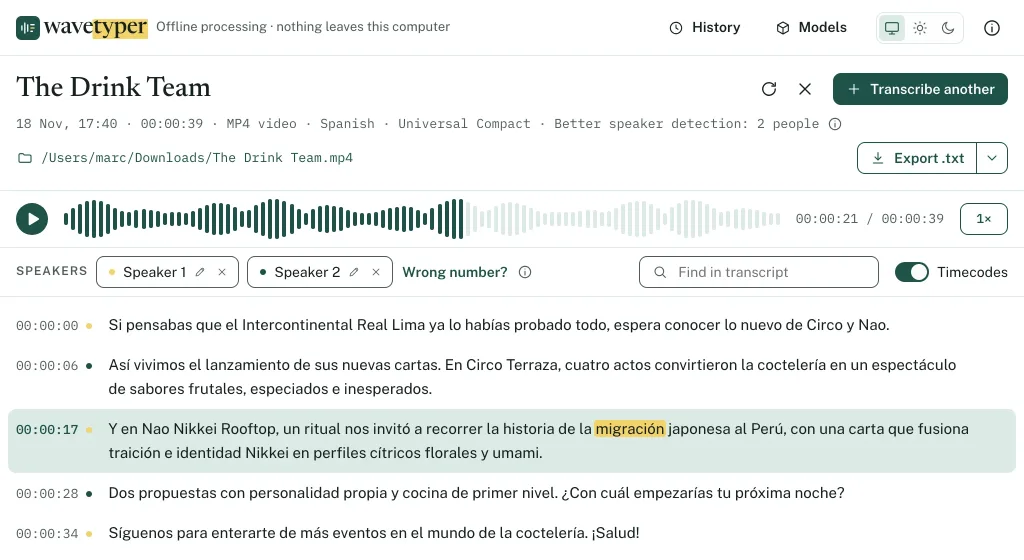
From recording to text
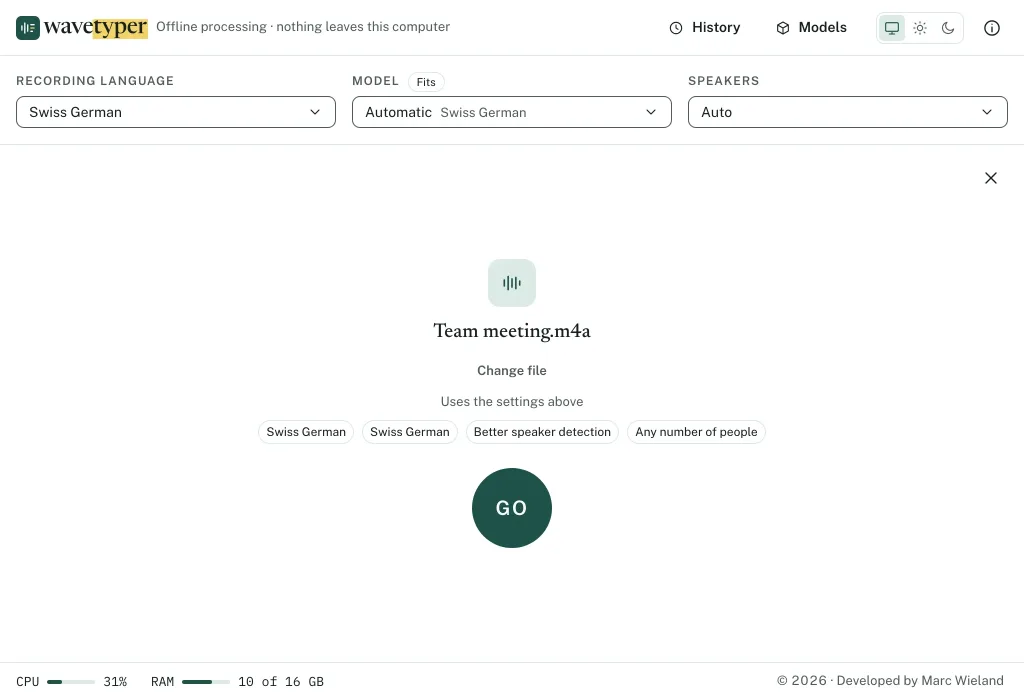
Drop a recording on the window. m4a, mp3, wav, mp4 and most other audio and video files work. Nothing starts yet. The app first shows the recording with the settings it is about to use: model, language, speakers. One look is enough, then you press GO. That catches a wrong language before an hour of work.
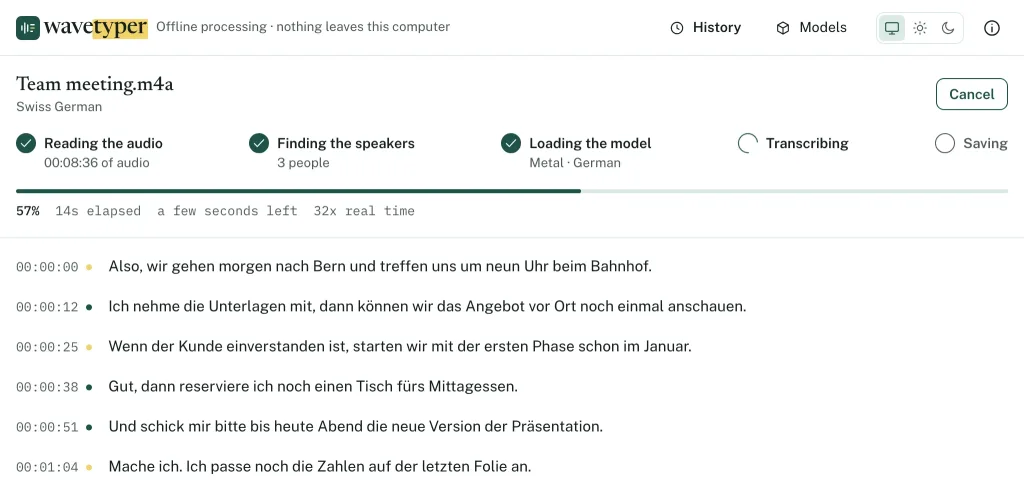
Then the steps run. A bar shows how far it is and how long it still takes. The lines appear while you watch. On my Mac, a 107-minute meeting in Thai took 5 minutes with Thai Compact. That’s about 20 times faster than the recording plays. The transcript is kept in the app’s history, with the time in front of every line. When you need a file, export it as text or as subtitles.
Privacy is important
Why not use a transcription service? You upload the file and get the text back. For a company meeting, that’s exactly the problem. The recording leaves the building, and so does everything people said in that room.
wavetyper does everything on the computer it runs on. Once a model is there, the app works offline. Recordings and transcripts never leave the computer. There’s no account, no tracking and nothing to pay, which matters most for business meetings.
The recording never leaves your computer.
It looks after the computer itself too. Before a run, it checks that the model fits into the free memory, and takes a smaller one when it doesn’t. If memory runs low during a run, it stops instead of freezing the laptop. Everything else stays usable while it works.
A setup for your computer
Which models fit depends on the computer, so you don’t pick them one by one. On the first start, the app asks for the language you mostly transcribe and for one of three setups:
- Precise brings the most accurate results with the biggest models. It’s meant for a computer with a graphics chip and 16 GB of memory, and downloads about 3.3 GB, more with Thai or Swiss German.
- Essential brings mid-sized models for older computers or a slower connection. It downloads about 1.1 GB.
- Minimal brings one small model, for when the others don’t run. It downloads about 300 MB.
The app measures the computer and the connection first, and marks the setup that suits them. Then the models download in the background, the one for your language first. So the first transcription can start before the rest is there. The setup can be changed any time under Models.
Pick a setup once, and the app brings the models that fit your computer.
Mac, Windows, Linux and older laptops
Where the work runs decides how fast it is. On a Mac with Apple silicon, it runs on the graphics chip. That’s where the 5 minutes for 107 minutes of Thai come from. On Windows and Linux, a graphics card with Vulkan support and enough free memory does the same.
Everywhere else the processor does the work, and the app makes the most of it. It processes only as much audio as each line needs, which cuts the time by about a third. It brings separate engines for older and low-end processors, so those run too. And it works at a lower priority, so the computer stays usable in the meantime.
A graphics chip makes it fast. Without one, it still gets there.
Without a graphics chip it is slower, but it gets there: a recording takes about as long as it plays with Thai Compact, and several times that with Thai Best. With less than 8 GB of memory, the memory check stops many runs before they start. These are the minimum requirements:
- Mac: macOS 13 or newer, Apple silicon or Intel. An Intel Mac transcribes on the processor.
- Windows: Windows 10 or 11, 64-bit.
- Linux: 64-bit Intel or AMD, with Ubuntu 22.04, Debian 12, Fedora 36 or newer.
- Memory: 8 GB, and 16 GB for Precise.
- Disk: about 2 GB free for Minimal, 5 GB for Precise.
Read along with the recording
A transcript you can’t check is only half done. So the recording plays right above the text. The word you hear is highlighted as it plays. Click any word and it plays from there, at normal speed, 1.5× or 2×. ⌘F or Ctrl+F finds a word.
Click any word and you hear exactly what was said.
Found a mistake? Double-click the line, fix it, press Enter. It’s saved at once, and every correction can be undone, with the buttons in the transcript bar or with ⌘Z or Ctrl+Z. The timecodes go on and off with one switch.
Calls on two tracks
Many screen and call recorders, CleanShot for example, keep your microphone on one track. The computer’s sound, with everyone else on the call, goes on another. wavetyper reads both tracks. The track tells it who is speaking, so it doesn’t have to guess.
That makes it the fastest and the most accurate way to a transcript with names. There’s no detection step, and that alone saves 2 to 4 minutes on a 25-minute call. Every line goes to the right person, even a quick “yes” in between. When both talk at once, both lines show up, and the player highlights both. One of my calls came back with 182 lines, and every single one had its speaker.
Two tracks mean no guessing. Every line goes to the right person.
Then name them. Click “Speaker 1” and type “Marc”, click “Speaker 2” and type “Client”. Every line follows at once, and an export as text reads like this:
[00:04:12.20 --> 00:04:18.60] Client: Can we move the launch to March?
[00:04:19.10 --> 00:04:19.90] Marc: Yes.
[00:04:20.40 --> 00:04:31.00] Marc: March works, if the texts are ready by the end of February.
Each speaker gets a colour of their own, for up to eight people. Every line gets a dot in that colour.
A meeting room
A meeting room has one microphone, so one track. For that, the app tells the voices apart itself, offline as well. Set Speakers to “Auto”, or to the number of people in the room.
It works well on longer turns and catches most short replies too. When several people talk at once, a line can still end up with the wrong person. Then click its dot and pick the right one.
Thai, Swiss German and about 100 more
Whisper’s general models cover about 100 languages at once. For Thai and Swiss German, dedicated models do better, and the app brings them along when you pick that language. Thai Compact and Thai Best come from Mahidol University. The Swiss German one writes what it hears as Standard German. So something like “Mir gönd morn uf Bärn” comes out as “Wir gehen morgen nach Bern”.
Hard audio stays hard, though. A meeting recorded from the far end of a long table comes out rougher than a call, in any language. Still, the results aren’t bad on poor audio, such as a phone recording from a pocket. The text is a first draft: you correct it into a final version, or use it as notes.
The history
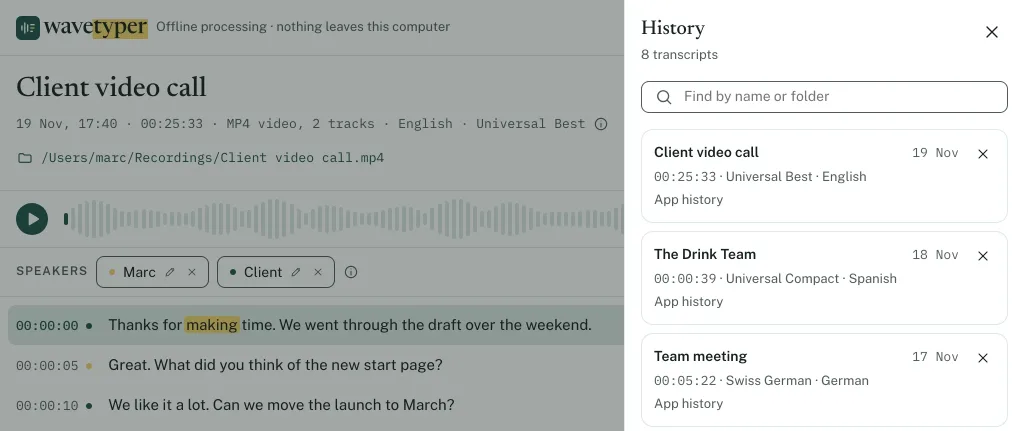
Every transcript lands in the history, with its date, length, model and language. A search sits on top. Open one and it plays along like a new one. Moved the recording? Point the app to it, and it plays again. Want another model, or more people? “Transcribe again” runs it with other settings.
A lite version for the browser
If you only want to try one recording, there’s no need to install anything. wavetyper Lite runs right in the browser: drop a recording and the text appears line by line. The browser does the work on your own computer, so nothing gets uploaded here either.
Lite has limits, because a browser has less to work with than a desktop app. It transcribes the first 10 minutes of a recording using one compressed model, which makes more mistakes than the larger ones. It reads files up to 1 GB, has no speaker detection, and needs a desktop browser with WebGPU support, such as a recent version of Chrome. The model downloads once (about 590 MB) and then stays in the browser.
So Lite is for a quick try or a short recording. For a whole meeting or for speaker detection, the desktop app does more.
Try it
- wavetyper for Mac, macOS 13 or newer, Apple silicon and Intel
- wavetyper for Windows, Windows 10 or 11
- wavetyper for Linux, an AppImage for Ubuntu 22.04, Debian 12, Fedora 36 or newer
- wavetyper Lite, in the browser, nothing to install
On the first start, pick your language and a setup, and the models download. It’s free, without ads or a subscription. The code is on GitHub. If it saves you time, you can support my work.
The app keeps itself up to date. At every start it checks for a new version and offers it with one click, and your models, history and settings stay. When a new version brings a better model for your setup, the app asks before it downloads anything.
Conclusion
A transcript is only worth something when you can check it. Hearing any word with one click and knowing who said it matter more than the transcription itself.
And if you record calls, record them on two tracks. It’s the fastest way to a transcript with names, and the most accurate one.